One Document or a Document Set?
Choosing the Right Level of Word Automation
The number of files is not the real question
A firm may prepare several Microsoft Word documents for one matter: an engagement letter, agreement, disclosure, checklist, cover letter, and internal note. At first glance, the choice between one-document automation and multi-document automation seems obvious. One document suggests a single-document tool. Several documents suggest a document-set tool.
 That shortcut can lead to the wrong decision. The better question is not how many Word files exist. The better question is how the work moves from the first answer to the final approved output.
Some offices maintain several Word forms that operate independently. Each form has its own purpose, its own answers, and its own review path. Other offices produce a coordinated package in which the same names, dates, roles, amounts, and choices belong in several separate documents. In that second situation, one answer may need to affect a whole set of files.
Product selection should begin with the workflow, not the feature list.
Start with the work
Before choosing a product, map the current document process. Identify which documents staff prepare repeatedly, which facts appear more than once, who reviews each output, and whether related documents are normally prepared together. Notice whether one answer affects only one document or several related files.
A useful review asks practical questions. Do the documents use the same client or matter information? Are they generated for one transaction, matter, hire, engagement, estate plan, or filing? Are they reviewed as a package? Does one condition add or remove a complete document? Does one corrected answer need to appear everywhere?
Those answers tell more than the file count. A single agreement may contain substantial automation: repeated fields, conditional clauses, calculations, party roles, pronouns, singular and plural wording, and carefully approved optional sections. At the same time, several short forms may have no meaningful connection except that they happen to be stored in the same folder.
What a one-document workflow looks like
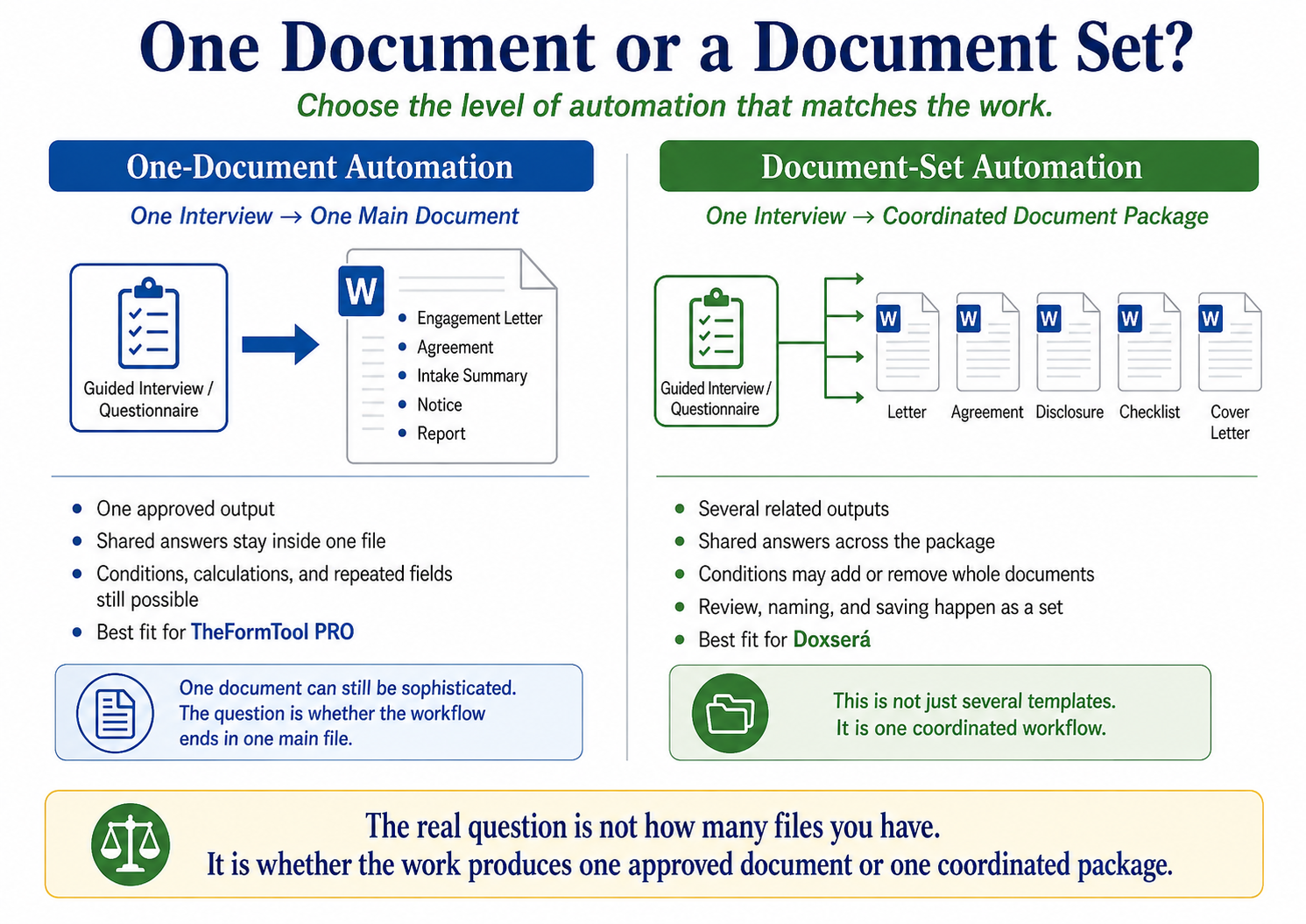
A one-document workflow is centered on one main Word document. The document may be an engagement letter, employment agreement, lease addendum, notice, public form, intake summary, or recurring report. It may be short or long, simple or sophisticated. The defining feature is that one guided process creates one principal output.
Within that one document, automation can still do serious work. A form can ask for information once and reuse it wherever it belongs. It can apply approved conditions, change singular and plural grammar, format dates and amounts, calculate related values, and include or remove clauses based on the answers. None of that makes the workflow multi-document. It means the single document is intelligent enough to carry professional decisions consistently through the draft.
TheFormTool PRO fits this kind of work well. PRO is designed for structured automation inside one Microsoft Word document. It supports guided questions, repeated fields, conditions, calculations, lists, pronouns, singular/plural language, and other form intelligence within that document. For many firms, that is exactly the right level of automation.
Single-document does not mean simple
It is easy to underestimate single-document work. A complex agreement can contain more professional logic than a small document packet. One Word file may need to handle several parties, multiple roles, optional clauses, calculated deadlines, alternative payment structures, signature variations, and carefully controlled defined terms.
In that situation, the value of automation is not that it creates several files. The value is that it captures the professional structure of one important document and applies it consistently each time the document is prepared. The output remains one file, but the intelligence inside the template can be substantial.
This distinction matters because offices sometimes buy more complexity than they need. If the work is genuinely centered on one approved output, a single-document workflow may be faster to build, easier to maintain, and easier for staff to adopt.
What a coordinated document-set workflow looks like
Multi-document automation becomes useful when several Word documents form one coordinated process. The documents are not merely stored together. They share answers, rules, review, and often file-handling requirements.
Common examples include estate-planning packages, HR onboarding packets, business-formation sets, financing document sets, litigation filing packages, client intake and engagement packages, and recurring compliance packets. These workflows usually require the same information to appear in more than one file. A name, address, date, role, amount, signature title, or selected condition may belong in several documents at once.
In a true document-set workflow, one answer should carry through the package. If the client name changes, every related document should use the corrected name. If the employee is remote, the package may need a remote-work agreement. If a selected role changes, signature blocks, notices, and internal checklists may need to change with it.
How Doxserá fits document sets
Doxserá fits workflows where one interview should create several related Word documents. It extends the same basic idea of guided answers and approved rules beyond one file and into a coordinated package. The user answers once, and those answers can be used across the related templates that make up the set.
That matters when the package itself is the work product. Doxserá can help teams reuse shared answers, apply conditions across related templates, include or exclude documents, maintain reusable passages, and produce an organized set for review. The firm still decides which documents belong in the package and which rules apply. Doxserá carries those approved decisions through the workflow.
This is not merely a convenience feature. It changes the drafting process from preparing several documents separately to assembling a related body of documents from one controlled source of answers.
Where Doxserá DB and Aurora enter the discussion
Doxserá DB and Aurora become relevant when the workflow needs to draw from external data or operate at a larger scale. A document set may depend on information already stored in Excel, Access, SQL, Outlook Contacts, or other approved data sources. A firm may need to generate documents from records rather than having a user type every answer into a questionnaire.
Those needs are different from simply wanting several documents. They involve source data, relationships among records, reporting, larger libraries, and often more formal control over who maintains the data and who releases the finished documents. The decision is still workflow-driven. The question becomes whether the documents depend on a single interview, an external data source, a broader document library, or a high-volume generation process.
The product ladder should follow the work: PRO for one-document Word automation, Doxserá for coordinated document sets, and Doxserá DB or Aurora when external data and larger-scale workflows become part of the approved process.
Do not confuse versions with document sets
Several versions of one document do not automatically create a multi-document workflow. A firm may maintain state-specific agreements, department versions, full-time and part-time forms, individual and organization versions, or different client-type documents. If one guided process still creates one final document, conditions may manage those variations inside a single-document workflow.
Multi-document automation becomes relevant when one matter requires several coordinated outputs. The difference is not variation. The difference is whether the final work product is one document or a connected set of documents that should be generated, reviewed, and controlled together.
Compare complexity, volume, and shared answers
The practical decision usually turns on three factors: complexity, volume, and reusable answers.
Complexity concerns the rules that shape the output. Do answers control entire sections or only small details? Do several parties need different treatment? Do calculations or dates depend on earlier answers? Do reusable clauses or passages appear in several places? A single long document may be more complex than a short packet.
Volume concerns how often the workflow is used. A frequently generated engagement letter may still be one-document work. A lower-volume estate package may still justify document-set automation because the package contains several coordinated outputs that share the same facts.
Reusable answers often reveal the strongest product fit. When names, dates, addresses, amounts, roles, and signature details repeat across several files, the workflow begins to point toward Doxserá. When those same details stay inside one main Word file, PRO may be the better starting point.
A practical selection review
Before choosing the product level, run one common matter through the proposed workflow. Follow the information from first entry to final review. Identify whether the answers remain inside one document or need to control several related files.
Ask whether the documents are reviewed separately or as a complete package. Notice whether conditions add or remove entire documents. Check whether file naming, saving, output order, and packet completeness matter. Consider who will build, test, maintain, and update the templates over time.
The best choice is not always the most advanced product. The best choice is the one that matches the approved workflow and leaves room for realistic growth.
Product selection checklist
Use these questions before deciding whether the work belongs in PRO, Doxserá, Doxserá DB, or Aurora:
-
- Does one guided process create one document or several?
- Do separate templates reuse the same client or matter information?
- Are the documents reviewed as one complete package?
- Can one answer add, remove, or change a complete document?
- Is approved content shared across several templates?
- Is automatic file naming, saving, or packet order important?
- Does the workflow depend on external data sources?
- How often does the team run the process?
- How many users depend on the automated workflow?
- Is the document package likely to expand?
- Who will build, test, and maintain the templates?
- Does the team need one intelligent form or a document system?
Conclusion
One-document automation and multi-document automation solve different workflow problems. TheFormTool PRO is well suited for structured single-document work inside Microsoft Word. Doxserá is the better fit when several related documents should be assembled from one guided process. Doxserá DB and Aurora enter the picture when external data, larger libraries, or higher-volume workflows become part of the system.
The right question is not how many files are in the folder. The right question is how the work is actually performed: one approved output, or a coordinated document set built from shared answers and rules.