Who Controls Your Client Data During Document Automation?
A Practical Question Before Any Automation Project
A professional document can contain far more than words on a page. A lawyer may be working with client names, case facts, financial terms, draft clauses, settlement details, or confidential instructions. An accountant may be preparing documents that include tax records, account numbers, ownership information, or company figures. HR and professional services teams may be working with compensation, employment, personal, or internal business information.
The finished Word document may stay inside the organization. That does not necessarily mean the information used to create it stayed there while the document was being assembled. In a document automation system, information may be entered into a questionnaire, processed by software, used to select clauses, applied to calculations, and then placed into one or more final documents.
Before adopting any automation system, a firm should understand that full path. The central question is simple: who controls the client data while the document is being created?
The Final Document Is Only One Part of the Workflow
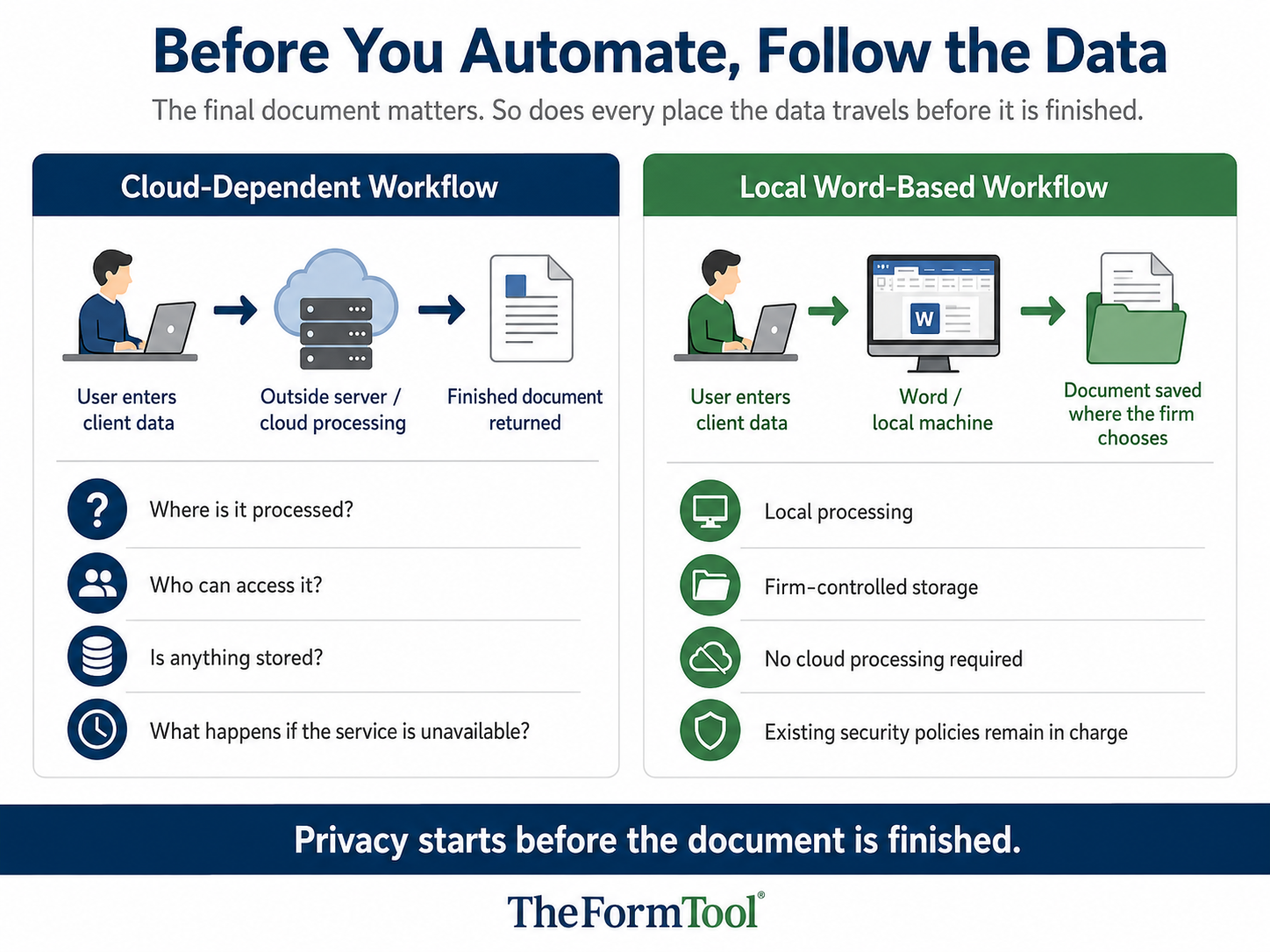
Many privacy discussions focus on where the final document is stored. That matters, but it is only part of the issue. Document automation involves several steps, and confidential information may be handled at each one.
A typical workflow may include entering client or matter details, applying document rules, selecting language, completing dates or calculations, generating one document or a full packet, and saving the result for review. Depending on the system, some of those steps may occur on the user’s computer, on a firm server, in a vendor-controlled cloud system, or through a combination of services.
That is why data control is not only a storage question. It is a workflow question. A firm needs to know where information is entered, where it is processed, whether it is transmitted outside the firm’s environment, and who can access it at each stage.
The First Question: Where Is the Data Processed?
The most important privacy question is often the easiest to ask and the hardest to answer clearly: where does the processing take place?
Different automation products use different models. Some operate locally on the user’s machine. Some work inside a private network. Some send information to an outside server for processing. Some combine local software with cloud-based services.
No model is automatically perfect. A local system still depends on secure devices, passwords, permissions, backups, and staff practices. A cloud system may have sophisticated safeguards but may also move client information outside the firm’s direct control. The point is not to assume. The point is to ask and verify.
Useful questions include:
- Does client or matter data leave the user’s computer or firm network?
- Does the provider process document contents or questionnaire answers?
- Are temporary files or saved responses created during assembly?
- Can the system work without an internet connection?
- Does the workflow rely on outside services to complete a document?
Control Also Means Storage, Access, and Retention
Processing location is only the beginning. A firm also needs to know what remains after processing and who controls it.
For example, completed documents may be saved in a local folder, a document management system, a shared drive, or a provider-controlled platform. Form answers may be discarded immediately, saved for later reuse, or stored as part of a matter record. Templates may be editable by a small group or available to many users.
These choices affect both privacy and management. Firms should understand who can view templates, who can generate documents, who can access completed files, whether saved answers remain available, how backups are handled, and what happens when an employee leaves.
Local control can be valuable because it lets the organization use its own storage, permission, backup, and retention rules. It also requires the organization to manage those duties carefully.
Questions to Ask Before Choosing a Document Automation System
A practical review does not need to begin with theory. It can begin with direct questions that identify where responsibility sits.
Data movement
- Does any client data leave our device, server, or network?
- Is document content transmitted during generation?
- Does the software contact outside servers as part of the process?
- Are questionnaire answers saved after the document is created?
Access
- Can provider staff view our information?
- Can user access be limited by role or password?
- Who may change approved templates or document logic?
- Can we control where completed documents are saved?
Storage and retention
- Where are temporary files stored?
- Can saved answers be deleted?
- How are backups handled?
- Who controls retention rules?
Operational control
- Can the system work when the internet is unavailable?
- What happens if the provider’s service is down?
- Can we continue using our existing Word templates?
- Can we keep the document process inside our existing Word-based workflow?
Clear answers help firms compare systems honestly. They also keep the discussion grounded in the actual movement of information rather than general promises about security.
Why No-Cloud Document Automation Can Matter
No-cloud document automation is not a slogan. For many professional users, it is a control choice.
When document assembly happens inside Microsoft Word and does not require cloud processing, the firm can keep the work within systems it already manages. Client information can remain on the user’s computer, internal network, or chosen document storage location, subject to the firm’s own security practices.
That approach can be especially important for lawyers, accountants, consultants, HR teams, and others who work with confidential professional documents. It may reduce the number of outside systems involved in the document process, make the data path easier to understand, and help the organization apply its own access and retention rules.
No-cloud automation does not eliminate the need for good security. Computers still need protection. Shared folders still need permissions. Backups still need care. Documents sent by email still need judgment. The advantage is that the firm can more clearly identify and control where the information travels.
How TheFormTool® Fits This Question
TheFormTool’s approach is deliberately Word-based. TheFormTool, Doxserá, Doxserá DB, and related products work inside Microsoft Word rather than requiring users to send documents to an outside drafting platform for assembly.
That matters because many professional offices already have a Word-based drafting process, existing template libraries, document management rules, and internal security practices. TheFormTool helps those offices improve the document process without forcing confidential drafting work into a cloud-dependent system.
A clean Word template can hold approved language. A guided form can ask for the information needed for the document. Rules can include or exclude language, repeat information where it belongs, calculate dates or amounts, and generate related documents from the same answers. Completed files can be saved where the firm chooses.
TheFormTool does not replace internal security policies, professional judgment, or final review. It gives firms a practical way to automate repeated Word document work while keeping the path of client information easier to see and manage.
A Sensible Data-Control Review
Before automating a document, a firm should map the information path. Start with the data the form collects: names, addresses, financial details, matter facts, employment information, tax records, case notes, or other confidential content. Then identify who enters it, where it is processed, where it is saved, and who can view it later.
The review should also consider which users can edit templates, which users can only run approved forms, whether saved answers are retained, how backups are handled, and what happens when access must be removed. In many organizations, this review should involve both document experts and technology or security staff, because each group sees a different part of the workflow.
A clear review may lead to different answers for different document types. A simple internal form may need one level of control. A client-facing agreement, tax document, medical record, or employment file may need another. The important step is to decide before the process is handed to everyday users.
Conclusion
Document automation privacy begins before the final Word file exists. It begins when a user enters information, and it continues through processing, storage, review, sharing, backup, and deletion.
Firms should ask where data goes, who can see it, who controls it, and what remains after the document is generated. No-cloud, Word-based automation can make those questions easier to answer because more of the process can remain inside systems the firm already controls. The right system should not require a firm to lose sight of client information in order to create better documents.