When Should You Automate Your Microsoft Word Documents?
Most offices do not begin with a document automation problem. They begin with a practical habit: open the last good document, save a copy, change the names, update the dates, adjust the details, and hope nothing old was left behind.
For a one-time document, that may be perfectly sensible. For repeated professional documents, it eventually becomes expensive. The cost is not only the time spent editing. It is the review time, the rework, the inconsistent language, and the small errors that survive because everyone assumed the old document was a safe starting point.
Microsoft Word document automation is useful when Word is still the right drafting environment, but copy-and-paste is no longer the right process. The goal is not to replace Word. The goal is to make Word do the repetitive work more reliably, while leaving judgment and final review where they belong: with the professional.
What Word Document Automation Really Means
Word document automation means turning a standard Word document into a reusable, controlled template. Instead of retyping the same information or editing a prior file, the user supplies the information once and the document places it where it belongs.
At the simplest level, that may mean inserting a client name, address, date, file number, or dollar amount throughout a document. At a more advanced level, it may mean choosing the correct paragraph, omitting language that does not apply, calculating dates or amounts, or producing several related documents from one set of answers.
The important point is that the document is no longer just a blank form. It carries part of the office’s drafting knowledge. Approved language, preferred formatting, repeated data, and drafting rules can be built into the template so users are not recreating the same decisions by hand each time.
Why Word Still Matters
Professionals still use Microsoft Word because Word remains the working language of many offices. Lawyers, accountants, consultants, HR teams, financial professionals, and other document-heavy organizations already know how to draft, review, revise, compare, save, and send Word files.
That familiarity matters. Many offices also have years of existing Word documents that contain approved wording, trusted layouts, and institutional knowledge. Moving everything to a separate system can be expensive and disruptive. Word-based automation improves the existing workflow instead of forcing the office to abandon it.
That is why tools such as TheFormTool PRO and Doxserá work inside Microsoft Word. The documents remain Word documents. The templates remain under the control of the office. Sensitive files do not need to be uploaded to a cloud system merely to assemble a document.
The Signs That Automation Is Worth Considering
Automation is not needed for every document. It becomes valuable when a document is repeated often enough, reviewed often enough, or important enough that manual drafting creates avoidable cost or risk.
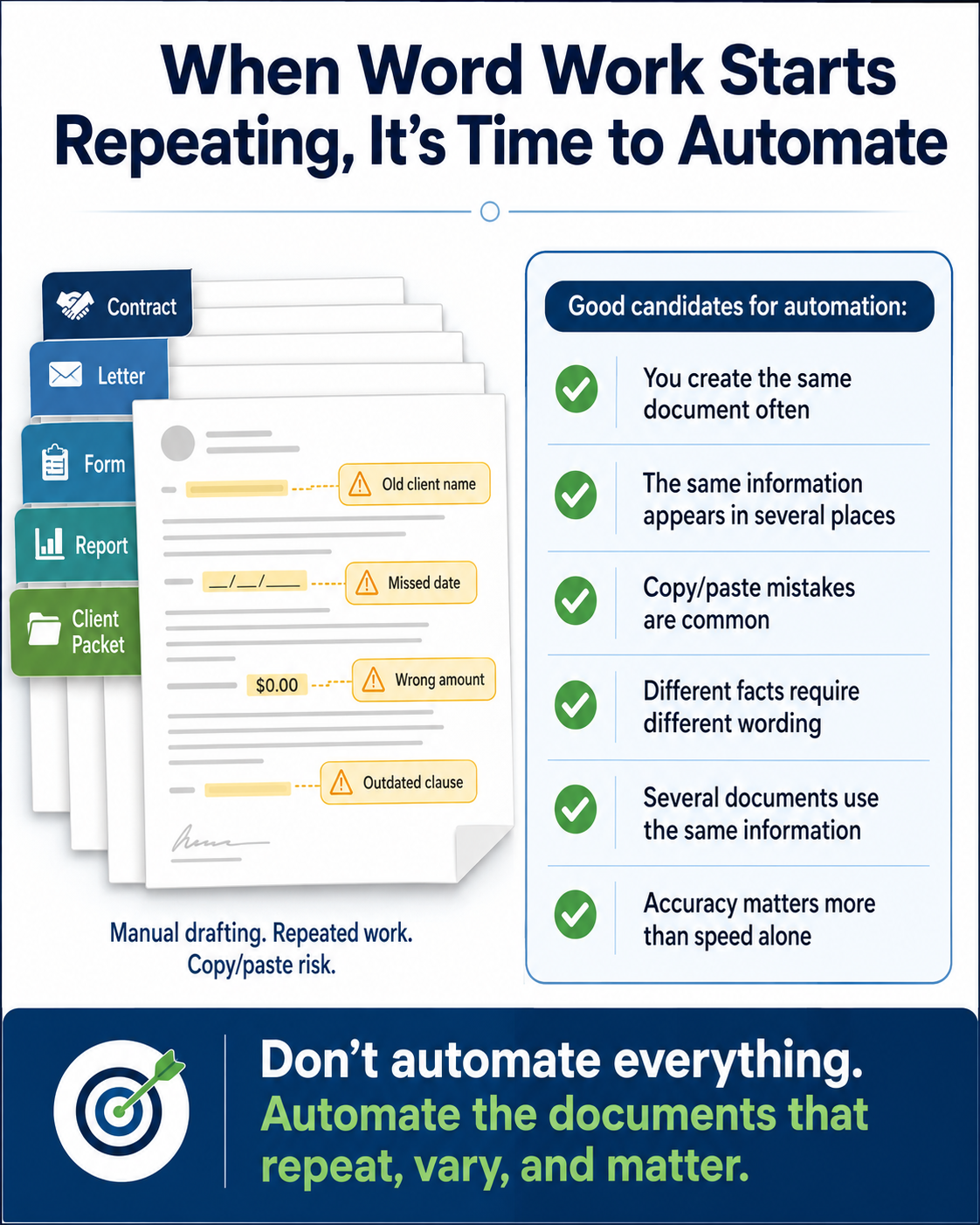
1. You regularly create the same kind of document. If your team creates the same letters, agreements, forms, reports, notices, or packets week after week, automation can reduce the repeated effort. The more often a document is reused, the more valuable a reliable template becomes.
2. You start by copying an old file. Copying a prior document is one of the most common sources of drafting mistakes. The old client’s name, date, address, fee, clause, or exhibit reference may remain in the new file. A clean automated template gives the user a better starting point.
3. The same information appears in several places. A client name, matter number, effective date, address, or defined term may appear throughout a document. When each instance is edited manually, one missed occurrence can create an embarrassing inconsistency. Automation lets the user enter the information once and reuse it consistently.
4. Different users produce different versions. If each person in the office relies on a different prior document or a different personal drafting habit, documents can drift. Automation helps keep approved wording, formatting, and structure consistent across the team.
5. The document changes depending on the facts. A paragraph may be needed only if the client is married. A clause may apply only to a commercial transaction. A disclosure may be required only in a particular state. When those choices are handled manually, review becomes more difficult. Rules-based automation can include the right language and leave out what does not apply.
6. Several related documents use the same information. Many professional workflows do not produce a single document. They produce a letter, agreement, checklist, disclosure, invoice, cover sheet, or internal memo from the same facts. More advanced document assembly can create a complete set from one interview or data source.
7. Review time is spent catching routine mistakes. Professional review should focus on substance, judgment, and client-specific issues. If too much review time is spent checking names, dates, pronouns, repeated amounts, numbering, and boilerplate, the drafting process is asking people to police problems that automation can often prevent.
A Practical Way to Decide
A useful test is to look at one document your office produces often and ask three questions:
• How much of this document is the same each time?
• How much changes from matter to matter?
• How much time is spent editing and checking routine details?
If most of the document is repeated, if the changes follow a pattern, and if review time is being consumed by routine corrections, the document is a good candidate for automation.
The first project does not need to be the most complicated document in the office. In fact, it usually should not be. A frequently used letter, intake form, engagement agreement, or internal report can be a better starting point. A successful first template proves the process, saves time quickly, and gives the team confidence before moving to larger document sets.
The Difference Between Simple and Advanced Automation
Not every office needs the same level of automation. Some users need simple field replacement and repeated information control. Others need conditional text, calculations, lists, multiple documents, or access to outside data sources.
TheFormTool PRO is suited to many straightforward Word automation tasks, including lists, conditional language, math and dates. It helps users start from clean templates, ask for information, and place repeated answers where they belong.
Doxserá adds more power for offices that need rules, conditional language, multi-document output, access to externally saved text and graphics, and more complex professional workflows.
Doxserá DB goes further by drawing information from external data sources such as Excel, Access, Outlook data, and SQL data bases.
The point is not to buy the most complicated tool first. The point is to match the tool to the document problem. A simple repeated form may need only simple automation. A complex matter packet may need full document assembly.
Privacy and Control Are Part of the Decision
For many professional offices, the location of the document and data matters. Legal documents, financial information, personnel records, medical-adjacent records, and client files may contain information that should remain under local control.
Cloud systems can be useful, but they are not always necessary for document assembly. Word-based tools from TheFormTool allow offices to automate documents while keeping the work inside Microsoft Word and under their own control. That is an important distinction for organizations that value confidentiality, local storage, and a familiar drafting environment.
Automation Does Not Remove Professional Review
Good automation reduces avoidable mistakes. It does not eliminate professional responsibility. The final document still needs to be reviewed by someone who understands the work, the client, and the consequences of the document.
That is one reason rules-based document automation is so useful. It does not pretend to replace judgment. It captures known drafting rules, applies approved language consistently, and reduces the burden of repetitive editing. The professional remains in control of the result.
Conclusion
You should consider automating your Microsoft Word documents when the current process depends too heavily on copying old files, retyping repeated information, and manually checking the same details over and over.
The best candidates are documents that are repeated, patterned, important, and prone to small but costly errors. Start with a document your office already understands. Build a clean template. Ask for the information once. Let Word assemble the repeated parts correctly. Then let the professional review the final work for substance.
That is the practical value of Word-based document automation: not replacing Word, not replacing people, and not adding unnecessary complexity. It simply gives professionals a better way to create the documents they already depend on every day.