Mail Merge vs. Document Automation: What Is the Real Difference?
Mail Merge has been useful for a long time, and for the right job it still is. If the task is to send the same letter to a list of people, with each recipient’s name and address filled in from a spreadsheet, Mail Merge does exactly what it was designed to do.
But many professional documents are not simply the same document repeated many times. Legal forms, engagement letters, HR packets, financial reports, compliance forms, and client-facing agreements often change depending on the facts. A clause may be needed in one matter and excluded in another. A paragraph may require different language. A date may need to be calculated. Several related documents may need to be produced from the same set of information.
That is where the difference between Mail Merge and document automation becomes important. Mail Merge fills blanks in a fixed document. Document automation builds the right document from the right rules.
What Mail Merge Does Well
Mail Merge was created for mass personalization. It starts with a standard document and a data source, often an Excel worksheet or CSV file. Word then replaces merge fields with values from the data source: name, address, company, account number, appointment date, or another simple item.
For announcements, labels, invitations, simple notices, and routine letters, this can be perfectly adequate. The format is the same for everyone. The only real difference is the data inserted into each copy.
That strength is also the limitation. Mail Merge assumes that the underlying document does not need to change very much. It is built around repetition, not judgment. It is excellent at “put this value here.” It is not designed to decide which provisions belong in the final document, whether a section should appear, or how a set of related documents should work together.
What Document Automation Adds
Document automation starts from a different premise. Instead of treating the template as a fixed document with blanks, it treats the template as a professional process captured in Word.
A well-built automated template can ask for the information needed, apply rules to that information, and assemble the finished document accordingly. It can include or exclude text. It can select among alternate clauses. It can repeat information where needed. It can calculate dates or amounts when the rules are known. It can also produce a group of related documents from one set of answers.
In other words, document automation does not merely fill a document. It helps the document respond to the facts.
This distinction matters most in offices where documents carry consequences. A law firm does not want a user editing a contract after the fact to remove the wrong clause or add the missing one. A financial office does not want a stale number repeated from an old file. An HR team does not want inconsistent language across offer letters and policy acknowledgments. The value of automation is not only speed. It is consistency, control, and fewer opportunities for avoidable error.
The Common Misunderstanding
Because both systems use templates and fields, Mail Merge and document automation are often treated as if they are different versions of the same thing. They are not.
Mail Merge is variable substitution. It takes data from a list and places it into a predetermined structure.
Document automation is rules-based assembly. It uses answers and logic to determine what the finished document should contain.
The difference is similar to the difference between filling out a label and preparing a professional document package. Both may involve names and dates. Only one requires the document to change intelligently based on the matter at hand.
Seven Practical Differences
1. The structure of the document
Mail Merge works best when the document structure is the same for every recipient. Document automation is built for documents that vary. The template can contain optional sections, alternate wording, repeated lists, and rules that control what appears.
2. The role of logic
Mail Merge can place data into fields, but it is not a practical tool for managing complex professional logic. Document automation is built around that logic. If a condition is true, one result appears. If it is not, a different result appears or the section is omitted entirely.
3. The number of documents produced
Mail Merge usually produces many copies of one document. Document automation can produce one document, several documents, or a full packet from one interview or data set. That matters when the same client, matter, transaction, or employee file requires multiple related forms.
4. The control of language
With Mail Merge, users often create a first draft and then manually edit the result. That is where errors creep in. Document automation moves more of that judgment into the template itself, where approved language and approved rules can be reused consistently.
5. The handling of calculations and dates
Many documents require more than copied data. They require due dates, notice periods, totals, percentages, prorations, or other predictable calculations. In a document automation system, those rules can be built into the template so users answer for information rather than perform calculations by hand.
6. The treatment of sensitive information
Many professional offices are understandably cautious about where client and business information goes. TheFormTool and Doxserá work inside Microsoft Word and do not require a cloud document server to assemble documents. For firms that want documents and data kept under their own control, that distinction is important.
7. The long-term value of the template
A Mail Merge template is often a convenience. A document automation template can become part of an office’s operating infrastructure. It captures preferred language, drafting decisions, conditions, calculations, and workflows so the same expertise can be reused by the whole team.
When Mail Merge Is Enough
Mail Merge is still a sensible choice when the job is simple. If every recipient receives the same document and the only changes are names, addresses, dates, or other basic fields, Mail Merge may be all that is needed.
There is no reason to overbuild a process that is already working. The right tool depends on the job.
When Mail Merge Starts to Break Down
The warning signs are usually familiar. Users start making the same edits after every merge. Someone keeps a checklist beside the template because the final document depends on facts Mail Merge does not understand. Clauses are copied from old documents. Dates are calculated separately. A packet of related forms must be assembled one at a time. Different users produce different versions of what should be the same work product.
Those are not simply productivity problems. They are control problems. The office is relying on people to remember every drafting rule every time. Good people can do that for a while, but the process is fragile. It becomes more fragile as volume increases, as staff changes, or as the documents become more complex.
Examples Where Automation Makes the Difference
Legal documents
Contracts, estate planning documents, pleadings, closing packets, and client forms often depend on facts that change the required language. The issue is not whether a name can be inserted correctly. The issue is whether the correct provisions appear in the first place.
Financial and accounting documents
Engagement letters, reports, proposals, and client communications often require consistent language, accurate figures, and repeatable treatment of known conditions. Automation helps reduce the need for after-the-fact editing and manual rechecking.
HR and employment documents
Offer letters and onboarding packets may vary by position, compensation structure, location, benefits, and policy requirements. A fixed template can quickly become a patchwork. A rules-based template can keep the variations under control.
Compliance and government forms
Documents that must follow specific formats or include required language are poor candidates for casual copying and editing. Automation helps enforce the approved structure and reduces the risk that required text is missed.
Multi-document workflows
Many professional tasks do not end with one document. A single matter may require a letter, agreement, disclosure, checklist, cover sheet, and internal instruction. With document automation, the same answers can drive the whole set.
TheFormTool Perspective
TheFormTool approach is intentionally practical. It begins where many professionals already work: Microsoft Word. The goal is not to force a firm into a new drafting environment or require a large technology project. The goal is to make Word documents smarter, more consistent, and easier to produce.
TheFormTool PRO supports powerful single-document automation. Doxserá extends that approach to multi-document assembly and more advanced workflows. Doxserá DB adds the ability to work directly with external data sources. Each step is aimed at the same problem: reducing repetitive work while keeping professional control in the hands of the people responsible for the documents.
That last point matters. Automation should not remove professional review. It should remove unnecessary retyping, unnecessary copying, unnecessary calculations, and unnecessary opportunities for mistakes. The final document still deserves human attention. The difference is that the reviewer starts from a stronger, more consistent draft.
A Simple Test
A useful way to decide whether Mail Merge is enough is to ask these questions: 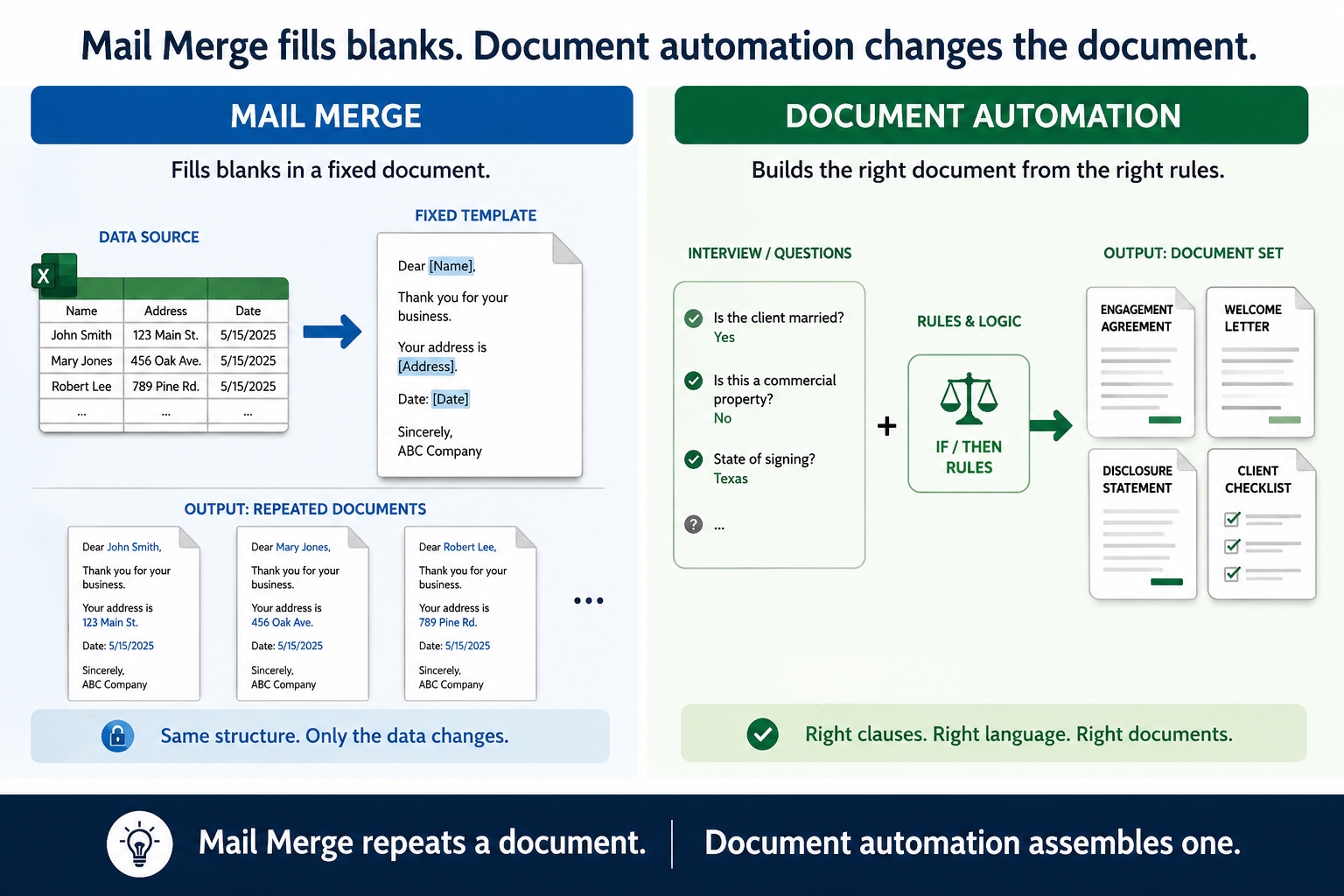
- Does the document change depending on the facts?
- Do users regularly add, delete, or revise clauses after the merge?
- Do dates, amounts, or repeated information have to be calculated or checked manually?
- Do several related documents use the same information?
- Would an error create professional, financial, compliance, or client-service risk?
If the answer to these questions is no, Mail Merge may be sufficient. If the answer is yes, the office is probably asking Mail Merge to do a job it was never designed to do.
Conclusion
Mail Merge is a useful tool for simple, repetitive personalization. It is not a full document automation system, and it was never meant to be one.
Document automation is for documents that need to adapt. It captures drafting rules, approved language, calculations, conditions, and multi-document workflows in reusable Word templates. For professional offices, that can mean faster drafting, better consistency, fewer avoidable errors, and greater control over sensitive work product.
The real question is not whether Mail Merge is good or bad. The question is whether it matches the work. For simple letters, it often does. For complex professional documents, rules-based document automation is the better tool.
Related Articles
How Document Automation Can Help Financial Services Reduce Errors