How to Automate Microsoft Word Documents Without Coding
Many professionals spend part of every day creating documents that are nearly identical to documents they created yesterday.
The names change. The dates change. The facts change.
But the document itself often remains largely the same.
Law firms create engagement letters, contracts, pleadings, and intake forms. HR departments prepare offer letters and onboarding documents. Accountants generate recurring reports and client correspondence. The lists go on almost endlessly: investment bankers, real estate managers, evaluators of all sorts, nearly every business produces proposals, agreements, notices, and internal forms.
The traditional approach is familiar:
Open an old document.
Save a copy.
Find and replace names, dates, addresses, and other details.
Review the document carefully to make sure nothing was missed.
It works.
Until it doesn’t.
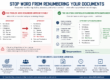
A missed client name, outdated clause, or incorrect date can turn a routine drafting task into an embarrassing mistake. This is why so many organizations are looking at document automation. The good news is that you do not need to be a programmer to automate Microsoft Word documents.
What Is Word Document Automation?
Document automation transforms a static Word document into a reusable drafting system. Instead of editing the document manually every time, the user answers a series of questions. Those answers are then used to build the final document.
For example, a service agreement might ask:
-
- Client name
- Company name
- Effective date
- State or province
- Service level
- Payment terms
The document then places those answers wherever they are needed and completes any computations needed for conditions, lists, date offsets, financial terms or math issues.
If the client’s name appears fifteen times, it is entered once and used fifteen times. If a date appears throughout the document, it remains consistent everywhere.
The goal is not to replace Microsoft Word. The goal is to eliminate repetitive editing while continuing to work inside a familiar environment.
The Real Cost of Copy-and-Paste Drafting
Many organizations underestimate how much time is spent preparing routine documents.
The individual edits are small. The cumulative effort is not.
More importantly, every manual edit creates an opportunity for error.
A contract may contain the correct client name on page one and the wrong client name on page eight. A proposal may reference pricing from a prior customer. A letter may contain an outdated date or address.
These mistakes are rarely caused by a lack of skill. They are the natural result of asking people to perform the same repetitive editing process hundreds of times.
The Hidden Cost of Repeated Drafting
If a professional spends ten minutes editing a routine document and creates twenty similar documents each week, that represents more than 170 hours each year devoted to repetitive editing. Most organizations would rather have their professionals focusing on clients, analysis, negotiations, and decision-making.
Document automation helps shift time away from clerical editing and toward higher-value work.
What Documents Are Good Candidates for Automation?
Not every document should be automated.
The best candidates are documents that:
-
- Are used repeatedly
- Follow a common structure
- Require many of the same pieces of information
- Contain standard language
- Need consistent formatting and appearance
Examples include:
-
- Engagement letters
- Service agreements
- Employment documents
- Intake forms
- Client correspondence
- Policy manuals
- Real estate documents
- Corporate records
- Compliance forms
This good rule of thumb is simple: If someone in your organization regularly starts with an old document and edits it into a new one, automation may be worthwhile.
Why “No-Code” Matters
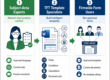
Many professionals hear the word automation and immediately think of programmers, databases, and complex software projects. In reality, modern document automation is best implemented by the people who understand the documents best.
That is important because document requirements change.
Clauses evolve. Policies change. Procedures are updated.
The people best equipped to manage those changes are rarely software developers. A no-code approach allows subject matter experts to maintain their own document systems without becoming programmers.
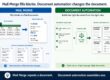
Document Automation Is More Than Mail Merge
Many people think document automation simply inserts names and dates into a template.
That is useful, but it is only the beginning.
Professional document automation systems can also:
-
- Calculate values automatically
- Determine dates and deadlines
- Apply business rules consistently
- Include or exclude content based on circumstances
- Generate multiple related documents from a single interview
- Ensure information remains consistent throughout a document set
Consider a real estate transaction. A user may know the purchase price, down payment, interest rate, and term. The software can calculate the loan amount, payment schedule, balloon balance, late charges, and other related values.
Or consider a foreclosure matter. The user may know the recording date and applicable jurisdiction. The software can determine notice periods, publication dates, sale dates, and related deadlines according to the governing rules.
In both cases, the user provides facts. The system applies rules. The result is not merely a completed document. It is a document that reflects expertise embedded in the process. That is very different from simple mail merge.
Why Many Professionals Choose Word-Based Automation
Word remains the document standard in many organizations. People know how to review, edit, compare, comment on, and distribute Word documents.
For many teams, the goal is not to replace Word. The goal is to make Word more productive. A Word-based automation system allows users to continue working within familiar workflows while reducing repetitive effort and improving consistency.
Privacy and Control Matter
Many organizations automate documents containing confidential information such as:
Client records.
Employee information.
Financial data.
Legal matters.
For these organizations, privacy is not an abstract concern. It is a professional obligation. That is one reason many firms prefer automation tools that operate within their own environment rather than requiring documents to be uploaded to third-party systems.
The ability to maintain control over both documents and data is often as important as the automation itself.
How Doxserá® Approaches Document Automation
Doxserá was designed around a simple principle:
The user provides information. The system applies rules.
A well-designed automated document does more than repeat information. It calculates values, applies conditions, selects appropriate language, and generates the documents required for the situation.
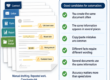
For example, one interview may produce an engagement letter, fee agreement, client instructions, intake forms, and internal administrative documents. Information is entered once and used wherever it is needed.
Conditional logic allows documents to adapt automatically. Different clauses can be included or omitted based on answers provided during the interview. Calculations can be performed automatically. Dates and deadlines can be generated consistently.
In many organizations, these rules originate with experienced professionals. Once embedded in a document system, they become available to everyone who uses it.
The result is not simply faster drafting.
It is the ability to make expert results available consistently across an organization.
Making Expertise Available
One of the most overlooked benefits of document automation is its ability to capture expertise.
In our most impressive customers, the most experienced professionals create and maintain the best versions of important documents. Those documents embody years of experience, judgment, and refinement.
When those documents become automated, that expertise becomes available to everyone who uses them.
A junior professional can begin with the same language, structure, calculations, and rules that an expert would use. An experienced professional can work more efficiently while maintaining consistency across matters.
The goal is not to make every user an expert. The goal is to make expert results available to every user.
Final Thoughts
Document automation is not about replacing professional judgment. It’s about reducing duplication, applying rules consistently, and deploying expertise where needed.
Organizations that generate large numbers of similar documents often find themselves re-doing the same edits, calculations, and reviews over and over again.
The right automation approach allows professionals to focus on the content that matters while the system takes care of the repetitive application of rules.
And contrary to popular belief, you don’t need to learn programming to get there.
Related: